Thursday, October 08, 2009
If you get an abortion in Oklahoma, it will be posted on a public website.
What possible motivation did they use to motivate painting a huge target on every woman who gets an abortion? Apparantly, the information will help the government to "decrease" the number of abortions. Banning abortions is one thing (namely retarded), but this is more akin to accessory to murder. And of course numbers are going to go down when you're facing quite a good chance of being fire bombed.

Wednesday, October 07, 2009
Thursday, September 17, 2009
It happened like I thought, only slower
Seeing the trailer for Halo 3: ODST I started thinking "hey, I should really take care of that Xbox Live issue". (see my previous post if you don't know what I'm talking about) But you know what? Microsoft finally did what I thought they'd do before. They cancelled my gold membership and reverted it back to silver. No more credit card nonsense. Yay! :)
Now I find myself in possession of all current generation consoles. It just kind of happened. It really did!
Now I find myself in possession of all current generation consoles. It just kind of happened. It really did!
Tuesday, September 01, 2009
Breaking through the great firewall of China/work
We've all experienced it. We've all hated it. Web filtering. Say it again. Filtering. It's disgusting just to hear it, let alone utter it. It's not filtering. Filtering is what you do to keep bugs out of your water. This is censorship. Well we will stand for it no more! It is time you fought back! And you can! All you need is access to a computer (Windows/Linux/Mac) with a clear line to the Internet, somewhere on the planet.
First download VirtualBox and Ubuntu then install VirtualBox. Once that's complete you should be presented with a window like below. Hit the big blue "New" button in the upper left corner. Then... You know what? Just follow the pictures. I'll be back once you get to the interesting bits. *walks off and gets some water*


Right, now you have a virtual machine with a virtual harddrive. In order to run services on the VM that are accessible to the outside world we'll need to change the network interface of the VM. So open "Settings" and select "Network" in the left menu. Under "Attached to:" select Bridged Adapter. This will give the VM a clear path to your router (or the Internet if you don't have a router). Under "Name:" you select your network card. Most people only have one but if you have several, you might have to change this if the VM can't access the network later on.

While we're in here, we might as well make sure the VM boots our Ubuntu image as well. Go to "CD/DVD-ROM". Open the media manager (marked in red). Select "Add". Browse to the ISO file you downloaded from Ubuntu earlier, select it, and you should have the window looking like below.


Now you're done! Press the big "Start" button and install Ubuntu once the desktop has loaded. The standard button to release your mouse and keyboard from the prison of the VM is your RIGHT CTRL key.

Select your keyboard layout, time zone etc. Just use the default selected option for hard drive partitioning. Let the installation program worry about that stuff. This is what I selected on step 5 where you choose your account name and password. Quite nice not to be forced to log in every time you start the VM.

Once the installtion is done, don't hit "Restart Now". We don't want to restart, we want to shut down. So hit "Continue Testing", then shutdown using the red power button in the upper right corner. Go back into "Settings" and deselect "Mount CD/DVD Drive", hit OK.


Now Start the machine again. You should see it booting up from the virtual hard drive instead of the CD image now. Now we're gonna install SSH and Privoxy. Open the package manager and enter your password when prompted.
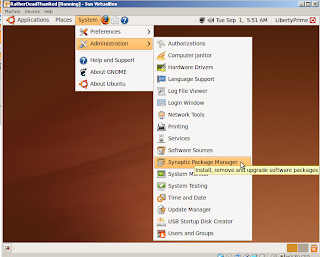
Mark OpenSSH-server and Privoxy for installation, the click Apply.


Congratulations, you are done. Both SSH and Privoxy will autostart with your VM. To actually use it I'm going to assume you're on your windows machine in China/at work. If you want help with this step on a Linux/Mac machine, say so in a comment below.
Download Putty. Open it. Putty is a bit weird in the way that it saves/loads sessions, so don't forget save at the end. Input the your IP. This should be your external IP, meaning the one that is usually given to you router. The port is 22 (default for SSH). Your router should forward port 22 to the IP of your virtual machine. And finally input a name as well.

Next set up a SSH tunnel like the picture, don't forget to click "Add".

Save your session so you can load it next time you open Putty.

Now click "Open" and log into your VM. All that's left is configuring your web browser to use your proxy server. This is what you should do in Firefox:

All done. Happy surfing! In a later post I will explain how to use your proxy server with any program, even those that don't support proxy servers (e.g. games). Because playing games in China/at work would be pretty sweet eh.
Edit: If you get the problem that Putty does not seem to be able to reach your computer you might have to enter some proxy details in it. You're most likely following this guide because the place you are at is using some kind of proxy server in the first place. You'll have to enter the proxy details in Putty here:

First download VirtualBox and Ubuntu then install VirtualBox. Once that's complete you should be presented with a window like below. Hit the big blue "New" button in the upper left corner. Then... You know what? Just follow the pictures. I'll be back once you get to the interesting bits. *walks off and gets some water*


Right, now you have a virtual machine with a virtual harddrive. In order to run services on the VM that are accessible to the outside world we'll need to change the network interface of the VM. So open "Settings" and select "Network" in the left menu. Under "Attached to:" select Bridged Adapter. This will give the VM a clear path to your router (or the Internet if you don't have a router). Under "Name:" you select your network card. Most people only have one but if you have several, you might have to change this if the VM can't access the network later on.

While we're in here, we might as well make sure the VM boots our Ubuntu image as well. Go to "CD/DVD-ROM". Open the media manager (marked in red). Select "Add". Browse to the ISO file you downloaded from Ubuntu earlier, select it, and you should have the window looking like below.


Now you're done! Press the big "Start" button and install Ubuntu once the desktop has loaded. The standard button to release your mouse and keyboard from the prison of the VM is your RIGHT CTRL key.

Select your keyboard layout, time zone etc. Just use the default selected option for hard drive partitioning. Let the installation program worry about that stuff. This is what I selected on step 5 where you choose your account name and password. Quite nice not to be forced to log in every time you start the VM.

Once the installtion is done, don't hit "Restart Now". We don't want to restart, we want to shut down. So hit "Continue Testing", then shutdown using the red power button in the upper right corner. Go back into "Settings" and deselect "Mount CD/DVD Drive", hit OK.


Now Start the machine again. You should see it booting up from the virtual hard drive instead of the CD image now. Now we're gonna install SSH and Privoxy. Open the package manager and enter your password when prompted.

Mark OpenSSH-server and Privoxy for installation, the click Apply.


Congratulations, you are done. Both SSH and Privoxy will autostart with your VM. To actually use it I'm going to assume you're on your windows machine in China/at work. If you want help with this step on a Linux/Mac machine, say so in a comment below.
Download Putty. Open it. Putty is a bit weird in the way that it saves/loads sessions, so don't forget save at the end. Input the your IP. This should be your external IP, meaning the one that is usually given to you router. The port is 22 (default for SSH). Your router should forward port 22 to the IP of your virtual machine. And finally input a name as well.

Next set up a SSH tunnel like the picture, don't forget to click "Add".

Save your session so you can load it next time you open Putty.

Now click "Open" and log into your VM. All that's left is configuring your web browser to use your proxy server. This is what you should do in Firefox:

All done. Happy surfing! In a later post I will explain how to use your proxy server with any program, even those that don't support proxy servers (e.g. games). Because playing games in China/at work would be pretty sweet eh.
Edit: If you get the problem that Putty does not seem to be able to reach your computer you might have to enter some proxy details in it. You're most likely following this guide because the place you are at is using some kind of proxy server in the first place. You'll have to enter the proxy details in Putty here:

Sunday, August 30, 2009
Why after 15 years I decided to end my personal war against the Playstation

I recently got myself a Playstation 3. I know what you must be thinking: "But Geek, did you not already own an Xbox360 and a Wii? Surely one doesn't need more than that? Especially since 99% of all games are released for both the Xbox360 and PS3! More importantly, have you not dedicated yourself to Sony's destruction ever since the launch of the Playstation 1 marginalised the Ultra 64?" That was exactly my argument when I got the Xbox360 (that, and it was cheaper).
So why did I now a year later buy a PS3 after all? Because Microsoft is a bunch of fucking DRM pushing software patent lobbying dip shits carrying the plague of monolithic legacy code bases.
I shouldn't be surprised. Since that was my opinion of Microsoft even before this shit fell into my lap.
It all started with the release of Street Fighter 4. Which in my humble opinion is THE fighting game, ever to be released; edging in just in front of Teenage Mutant Ninja Turtles: Tournament Fighters for the SNES. The killer feature in favour of SF4 is the inclusion of online play. Finally, I have access to billions of opponents (I realise the actual number of SF4 players might be substantially lower).
Here's the kicker, to play online on the Xbox360 you have to pay up. Microsoft won't let you use their network for actual gaming unless you pay a monthly fee of $7.99. Thinking I'll actually only play actively for one or two months anyway, I pay for 3 months of gold membership (as they call it) for a whopping $20. As I always do, I create a virtual credit card with precisely $20 on it, input the info on my Xbox360, and boom I'm in the game getting my ass kicked by unknown stranger after unknown stranger.
Time goes, and I play less and less (perhaps mainly because the D-pad on the Xbox360 sucks donkey balls). As I predicted, I have no wish to extend my gold membership. Along comes a mail from Microsoft indicating that they can not withdraw the necessary membership fee from my credit card (as I intended). Seeing as how the console is shipped with a one month trial membership which automatically reverts to the normal silver membership once the time is up, I believed that the same principle would apply when they didn't get the cash from me. How wrong I was.
First they just suspended my gold membership effectively making it silver. "Great!" I thought to myself, just what I wanted. I could still download demos and use the Xbox Live Store and all, just not play online which I didn't want to. But soon after, they suspend my entire account! No access to Xbox Live at all! I even tried creating a new account, but no luck. Must be bound the console or something.
Then I actually start looking into resolving this shit because I actually wanted to use Xbox Live to download demos and buy Live games. And it turns out, there's is no way to cancel your subscription for gold membership through the console. Oh there's a big "Sign Up" button, but no bloody "Cancel" button. Apparently the only way was to PHONE them! Excuse me? Phone? I hardly have a phone. I consider my iPhone to be more of a wearable computer than a phone. You're a computer company for fuck's sake! Get with the program and put your shit online! A friend later told me that you could through https://billing.microsoft.com/ but note that it was NOT possible through the Xbox Live homepage, which I thought was the natural place to look.
Now, that they've locked my account however, I can't go through that page. I'll have to call them, or give them a new credit card with credits on it. Not being that fond of the whole concept of speaking with customer service, I start thinking of alternatives. There's only one series that's Xbox360 exclusive that I'm interested in and that's Mass Effect (fucking amazing game). With numbers two and three looming on the horizon, I have to get this shit sorted. Luckily, it's released for Windows PCs. My computer having been upgraded to a kick ass 8(4) core iCore7 and GTX260, that's good news. I still wanted a machine to handle my media playing needs and the other 99% of games that are cross platform and that's where the PS3 comes in.
For my media viewing needs, it's everything I ever wanted. It plays everything smoothly over the network, or USB stick. It's fast, even when browsing through my external media drive which the Xbox360 frankly was shit at. It's also glossy black so it happens to looks terribly good in front of my glossy black Samsung TV. Korean and Japanese technology fused together in a dark, shiny glory. It's not perfect however.
Why the fuck does everything have to install? I pop a game disc in it, it has to install it. I download a demo from the Playstation Network, it has to install it after it's done downloading. It's not a fucking PC. It shouldn't have to install anything. No one ever accused a Playstation of being free of loading times though.
I have to give praise for the use of a standard PC power connector and having its PSU internally (another area where Microsoft fails miserably). This meant I could buy my PS3 from the UK and not worry about their idiot three pin plug. Just take a spare cable with a proper plug from the closet, plug in, and I'm done. HDMI connector in the back, thank you very much. So I ended up using none of the cables that came with the thing (except the USB cable for recharging the controller). Built in WiFi meant I could get rid of the network cable that had been blocking the entrance to the kitchen. The Xbox360 does not come with built in WiFi. For that you have to cough up about another €70. Effectively making it more expensive, while having less features, than the Playstation 3 at current prices. Way to go mr Balmer.
Oh and the controller. I never really did like the PS controller being a SNES zealot. But it's quite good I have to say. I still don't like the square, triangle and so forth labeling on the buttons. I just find it confusing because I can't devise an easy system for remembering their locations. But the D-pad.. Yeah, it fucking pwns the Xbox360 controller in the face.
Tuesday, August 18, 2009
Back from Prague
Spent the weekend in Prague. Sunny skies and warm weather. A fantastic city with grand sights and good beer.
Best thing I ate was roast pork knee. Yes, a knee, I kid you not! The place had actually drawn a pig on a blackboard and a large arrow indicated the knee quite clearly.
I believe I share my love of knees with wolves and beers.

Best thing I ate was roast pork knee. Yes, a knee, I kid you not! The place had actually drawn a pig on a blackboard and a large arrow indicated the knee quite clearly.
I believe I share my love of knees with wolves and beers.

Monday, August 10, 2009
Seriously bored
I three weeks I'll have left my current job and started my physics studies. Until then I am doomed to labour in boredom it seems. Parallell to my leaving, my department is transferring to China; meaning less and less for us over here to do.
I am literally not doing anything work related at work these days. And it sucks...
I am literally not doing anything work related at work these days. And it sucks...
Subscribe to:
Posts (Atom)


 Posts
Posts

